Jalwa Game account, app and wallet information18+ • Play within a fixed budget
Jalwa Game • Login • Register • App • Wallet

Jalwa Game Login, Register, App & Wallet Checks

Jalwaa.info par Jalwa Game ke account access, registration fields, app lobby, games, deposit, withdrawal aur support screens ko simple Hinglish me samjhaya gaya hai. Focus practical checks par hai: kya dekhna hai, kis detail ko verify karna hai aur issue aaye to proof kaise ready rakhna hai.

18+Responsible play only
13Real Jalwa screen captures used
2Login & Register actions
1Clear account-to-wallet flow
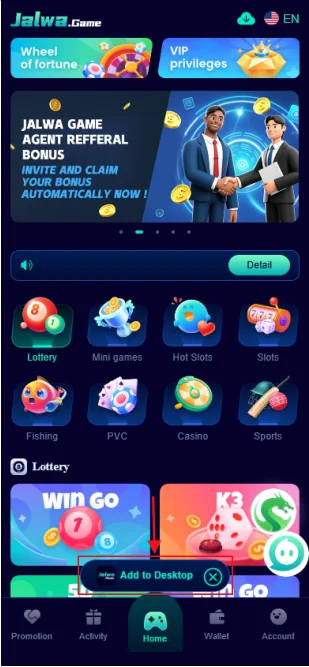
Jalwa Game app lobby showing game categories and account navigation
App lobby capture: games and bottom navigation are visible together.

Jalwa Game ko samajhne ka practical starting point

Jalwa Game use karne se pehle account aur wallet flow ko alag-alag samajhna useful hai. Login sirf account access ka step hai; register new account setup ke liye hai; deposit wallet me amount add karne se related hai; withdrawal wallet se bank route ki request hai. In actions ko mix karne se confusion hota hai, especially jab transaction pending ho ya password reset karna ho.

Provided captures me Jalwa branding ke saath registration form, game lobby, wallet controls, deposit channels, withdrawal form, password change, forgot-password flow, game history, agency/referral area, gift-code field aur service-center options clearly visible hain. New build me in screenshots ko wahi use kiya gaya hai jahan unka context match karta hai.

Interface version ke hisaab se labels, available games aur payment channels change ho sakte hain. Isliye visual ko reference samjhein aur action complete karte waqt current screen par amount, account detail aur confirmation text dobara check karein.

Account first

Registered phone, password aur OTP privacy ko priority dein. Wrong phone se login ya recovery fail ho sakti hai.

Wallet second

Deposit aur withdrawal ke reference IDs alag save rakhein. Pending status me proof useful hota hai.

Play limits

Game result ko fixed income na samjhein. Session budget aur stop point pehle decide karein.

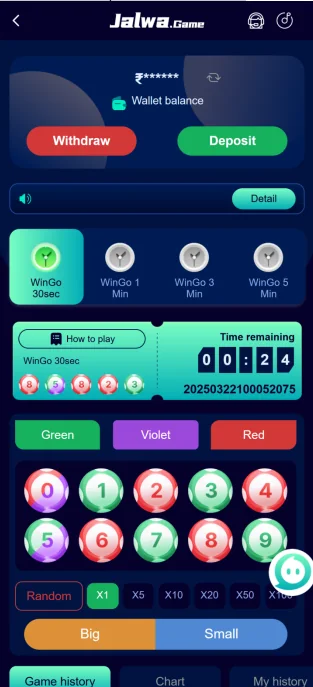
Jalwa Game Wingo style game screen with wallet, color options and timer
Game capture: wallet controls, timer and color/number choices visible hain.
Game screen

Jalwa Game lobby me round start karne se pehle kya dekhein

Game capture me top area par wallet balance aur Deposit/Withdraw controls, beech me Wingo tiles, timer, color choices aur number options dikhte hain. Round join karne se pehle selected amount, remaining time aur chosen option ko ek baar read karna important hai. Fast timer me rushed tap se wrong selection ho sakta hai.

Game history aur current round ko separate samjhein. Previous results next result ki guarantee nahi dete. History sirf record hota hai; usse guaranteed pattern assume karna risky hai. Agar app slow ho ya timer freeze feel ho, amount place karne ke bajay network stable hone ka wait karna safer behavior hai.

Important: Result chance-based ho sakta hai. Loss chase karne ke liye next amount increase karna responsible play nahi hai.
Jalwa Game gift code screen with code input and receive button
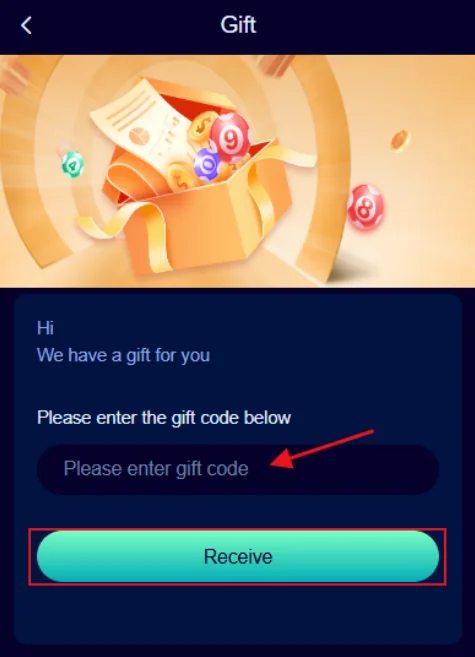
Gift screen capture: code field and Receive action visible hain.
Gift & reward screen

Gift code ya reward text ko blindly trust na karein

Provided capture me Gift section ek code field ke saath visible hai. Code enter karne se pehle characters, expiry condition aur account eligibility current app me verify karna chahiye. Random messages me mile codes, altered screenshots ya guaranteed reward claims par dependent decision avoid karein.

Older Jalwa properties me signup-reward messaging use hui thi, lekin current amount ya eligibility time ke saath change ho sakti hai. Is site par koi fixed reward promise nahi kiya gaya. Jo current app screen dikhaye, wahi final condition samjhein.

Login aur registration ko clean rakhein

Login issue solve karne ke liye sabse pehle registered phone number confirm karein. Password manually type karte waqt accidental space, wrong capitalization ya outdated saved password problem create kar sakta hai. OTP-based step aaye to newest code use karein. Kisi support contact ko password, OTP, UPI PIN ya bank login detail dena zaroori nahi hota.

New registration me phone number, password, confirm password aur invite-code fields provided capture me dikhte hain. Form submit karne se pehle password dono fields me same hai ya nahi, phone number correct hai ya nahi aur invite code me extra character to nahi, ye confirm karein. Registration complete hone ke baad account profile aur wallet area open karke basic details match karna useful hai.

Login issue

Same registered number use karein, current password try karein aur recovery option ko correct account par run karein.

New account

Phone, password confirmation aur invite-code characters submit se pehle compare karein.

Account safety

OTP, password, payment PIN aur full banking credentials private rakhein.

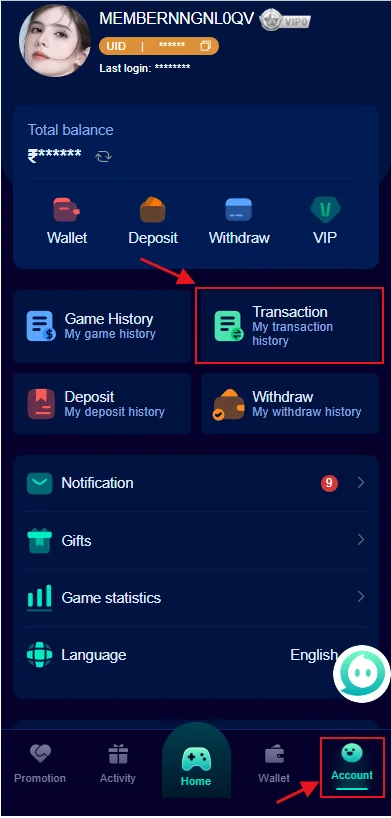
Jalwa Game account dashboard showing wallet, deposit, withdraw, history and settings
Account capture: wallet, histories, gifts, language and settings options visible hain.
Account area

Account dashboard me wallet aur history ko kaise read karein

Account capture me Wallet, Deposit, Withdraw, VIP, Game History, Transaction, Deposit, Withdraw history, Notification, Gifts, Game statistics aur Language jaise options dikhte hain. Issue diagnose karne ke liye current balance ko transaction history ke saath compare karna useful hai.

Deposit successful message ke baad wallet credit na ho to deposit history aur transaction record ka time compare karein. Withdrawal request pending ho to request time, amount aur receiving account details note karein. Screenshot lene se pehle personal phone number ya banking details ko public sharing me expose na karein.

Deposit se pehle three-point verification

Amount add karne se pehle selected channel, entered amount aur receiving wallet ko confirm karein. Provided deposit capture me multiple payment-channel cards aur preset amount buttons visible hain. Channel availability har account ya time par same ho, ye assume nahi karna chahiye.

Payment complete hone ke baad UPI or bank reference ko save rakhein. Wallet immediately update na ho to same amount dobara send karne se pehle first transaction status check karein. Duplicate payment confusion ko badha sakta hai.

Pending case me useful proof hota hai: amount, exact time, transaction reference, payment status aur wallet screenshot. Sensitive PIN ya full banking login detail proof ka part nahi hona chahiye.

Channel

Current deposit screen par selected route ko confirm karein.

Amount

Preset ya manual amount submit karne se pehle digits check karein.

Proof

Reference ID, time aur success/pending status save rakhein.

Withdrawal me bank detail sabse important

Withdrawal capture me available balance, bank-account add option aur amount field visible hai. Cash-out request se pehle bank recipient name, account number aur phone detail correct hona important hai. Provided bank-account capture me recipient name, account number, phone, email aur IFSC-style code fields dikhte hain.

Withdrawal delay ka matlab automatically failure nahi hota. Account verification, wrong bank detail, minimum threshold, processing queue ya network state jaise factors affect kar sakte hain. Same request repeatedly create karne se pehle existing request status read karein.

Support ko complaint bhejte waqt request time, amount, receiving bank ka masked detail aur screenshot useful ho sakta hai. OTP, PIN ya full password kabhi share na karein.

Bank details

Recipient name aur account number submit se pehle twice check karein.

Request status

Withdrawal history me pending, completed ya failed state compare karein.

No chasing

Loss recover karne ke pressure me deposit karke withdrawal force karna avoid karein.

Jalwa Game support issue ko structured way me explain karein

Customer-care section tab useful hota hai jab login, registration, app loading, deposit, withdrawal ya account security me clear issue ho. Short message me issue type, device, exact time, amount if relevant, reference ID aur screenshot mention karna better hai.

Provided service-center capture me settings, feedback, notifications, 24/7 customer-service style option, beginner information aur about-us shortcuts dikhte hain. Current app version me labels change ho sakte hain, isliye support route open karte waqt Jalwa branding aur account context verify karein.

Support contact ko password, OTP, UPI PIN, card CVV ya bank login dene ki need nahi honi chahiye. Agar koi person ye details maange, action stop karke account security check karein.

Login proof

Error message + time + registered number ka masked version.

Payment proof

Amount + reference ID + wallet status + screenshot.

App issue

Device model + app version + error state + network type.

FAQ

Jalwa Game common questions

Short answers account, app, payments aur responsible play ke most common points cover karte hain.

Jalwa Game login ke liye kya ready rakhein?

Registered mobile number, current password aur stable network ready rakhein. OTP aaye to sirf current verification screen par use karein aur kisi person ke saath share na karein.

Jalwa Game register karte waqt invite code kahan milta hai?

Registration capture me invite-code field visible hai. Code ke characters ko carefully compare karein; extra spaces ya wrong digits se form submit nahi ho sakta.

Jalwa Game app me kaunse sections dikhte hain?

Provided app captures me game lobby, wallet, deposit, withdrawal, account, game history, gifts aur service-center options visible hain. Interface time ke saath change ho sakta hai.

Deposit pending ho to pehla check kya hai?

Amount, payment reference, wallet balance aur transaction time compare karein. Same payment ko repeat karne se pehle previous status confirm karna better hai.

Withdrawal ke liye bank details me kya check karein?

Recipient name, bank account number, phone detail aur requested amount carefully verify karein. Wrong account data delay ya failed request ka reason ban sakta hai.

Password bhool gaye to kya karein?

Forgot-password flow me registered phone, new password, confirmation aur verification code fields dikhte hain. Latest code use karein aur password unique rakhein.

Jalwa Game me risk kaise control karein?

Fixed budget, fixed session time aur stop point decide karein. Loss recover karne ke pressure me amount increase karna avoid karein.

Account se wallet tak complete flow ko kaise connect karein

Jalwa Game ka experience tab zyada clear hota hai jab har action ka expected record samajh me ho. Registration ke baad account identity banti hai, login se wahi identity open hoti hai, app lobby se game categories access hoti hain, deposit se wallet balance add hota hai aur withdrawal se available balance ko receiving-bank route ke through request kiya jata hai. Har stage ke baad ek visible record hona chahiye—profile state, transaction reference, wallet movement ya history entry. Agar kisi stage ka record missing ho, next financial action se pehle wahi gap investigate karna practical hai.

Example ke liye deposit successful dikh raha hai lekin wallet unchanged hai. Is case me game round join karke balance test karne ki jagah deposit reference aur transaction history compare karein. Isi tarah withdrawal request create ho gayi lekin receiving bank me amount nahi aaya, to new withdrawal create karne se pehle request status, timestamp and masked bank detail verify karein. Structured flow unnecessary duplicate actions ko reduce karta hai.

New device par Jalwa Game open karte waqt

Phone change hone ke baad login screen familiar lag sakti hai, lekin saved credentials and device permissions new context me differ kar sakte hain. Registered number manually check karein, password current ho and recovery phone accessible ho. Login ke baad wallet balance, game history and account profile ko previous known state se compare karna useful hai. Unexpected difference mile to payment action stop karke account security first check karein.

New device par screenshots and notification permissions bhi change ho sakte hain. Support evidence save karna ho to sensitive information mask karein. Device kisi aur ke control me raha ho, used phone ho ya public workstation ke through account open hua ho to password update and session cleanup sensible security step hai.

Transaction record ko simple format me save karein

Wallet-related problem me best record short and consistent hota hai: action type, amount, date, exact time, transaction reference, current status and one masked screenshot. Deposit and withdrawal ko same note me mix na karein. Alag transaction record hone se duplicate payment, wrong reference or wrong timestamp confusion kam hota hai.

Proof ka purpose secret credentials share karna nahi hai. UPI PIN, OTP, password, card security code and full bank-login information evidence nahi hote. Agar screenshot me account number or phone visible ho to public sharing se pehle mask karna better hai.

App captures ko kaise interpret karein

Is build me used screenshots actual Jalwa Game-related captures hain jo registration, lobby, game history, payment, account and service contexts dikhate hain. Screenshot ko current guarantee nahi samjha gaya. App redesign, version update or account-specific availability ki wajah se colors, button positions or game categories change ho sakte hain. Isliye text visual concept explain karta hai, while current app screen action decision ka final reference rehta hai.

For example older capture me gift-code field visible hai. Isse sirf itna confirm hota hai ki captured version me aisa field tha. Current reward amount, eligibility or code validity automatically establish nahi hoti. Isi principle ko payment channels and referral options par bhi apply karein.

Responsible session ka practical structure

Chance-based play me budget and time limits round start hone se pehle decide karna better hai. Session ke beech result dekhkar limit change karna emotional decision ban sakta hai. Fixed entertainment amount, fixed session duration and pre-decided stop point simple structure provide karte hain. Loss ke baad next amount double karna ya essential funds use karna risk sharply increase karta hai.

Winning session me bhi limit useful hoti hai. Repeated rounds se confidence overextend ho sakta hai. Game history pattern ko future guarantee samajhne ki jagah past record hi samjhein. Agar play stress, borrowing, hidden spending or essential expense delay cause kare to session stop and outside support priority honi chahiye.

Before any Jalwa Game action, use this five-step pause

Identify: confirm which account and which task you are working on. Verify: check the current phone, amount, bank detail or game period. Record: save the relevant reference or screenshot. Protect: keep OTP, password and PIN private. Decide: only continue if the action fits your pre-decided budget and the screen state is clear.

This same pause works across login, registration, app setup, deposits, withdrawals and fast game rounds. It reduces rushed taps, duplicate transactions and accidental use of the wrong account or payment route. When anything feels inconsistent, verification should come before another financial action.

Final pre-action reminder

Jalwa Game me account, wallet and game controls closely connected hain, isliye haste me ek wrong tap multiple records ko affect kar sakta hai. Phone, amount, receiving bank or selected round ko submit se pehle one last time read karein. A clear record today makes any later troubleshooting much easier.